From Console to Configuration: Building a Secure AWS Stack with Terraform
The Journey of a Junior Cloud Engineer moving from “ClickOps” to Infrastructure as Code.
If you’re just starting your cloud journey, you know the feeling. You open the AWS Console, and it’s a sea of buttons, checkboxes, and dropdowns. For my latest project, I decided to stop clicking and start coding.
I took a personal Junior Cloud Engineer project to deploy a secure web application. I had a choice: spend an hour clicking through the console (and hoping I didn’t miss a single checkbox), or use Terraform.
I chose the code. And honestly? It was stressful. But by the end, the score was Me: 1, Terraform: 0.
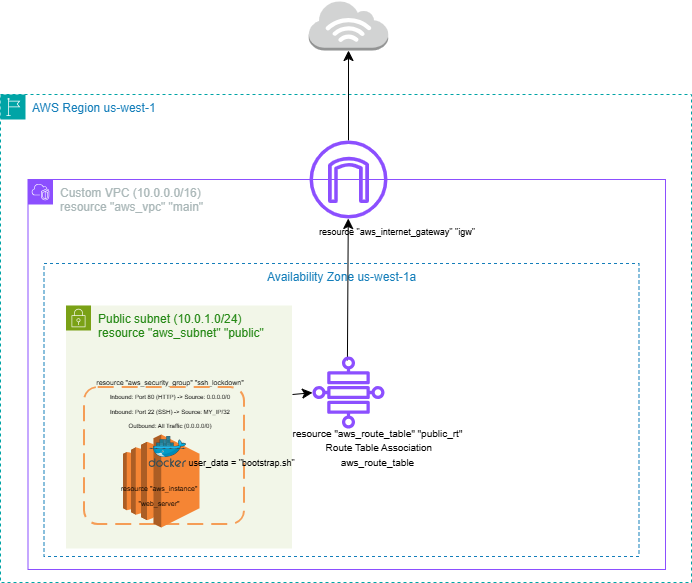
The Project: What I Built
The goal was simple but critical: build a secure, automated environment for a small company.
A Custom VPC: Not the default one, but a hand-coded network with subnets and an Internet Gateway.
Security First: I locked down SSH access so only my IP could get in. No open ports for the world to see.
Docker Integration: I didn’t just launch a server; I used a
userdatascript to install Docker and launch a container the second the instance breathed its first breath of life.
Why Terraform? In the industry, we call manual clicking “ClickOps.” It feels fast at first, but it’s a trap. Here is why I fought through the Terraform learning curve:
Speed: Once my script was ready, I deployed the entire network in under 60 seconds.
No More “Oops”: If I manually click 50 times, I’ll make a mistake on the 51st. Terraform does exactly what I tell it to, every single time.
The “Undo” Button: If I want to start over or save money, I type
terraform destroy. Every single resource—VPC, IGW, EC2—is wiped clean in seconds. No "forgotten" resources running up my bill.

The Struggle: Challenges I Faced
It wasn’t all sunshine and green checkmarks. Here is what I learned the hard way:
The Syntax Struggle: Missing a single bracket
{or a quote mark"can break your whole plan. I spent a lot of time debugging mymain.tfuntil I realized that Terraform documentation is your best friend.The State File Panic: Learning that Terraform “remembers” what it built via a state file was a game-changer. If you lose that file, Terraform gets “amnesia” about your cloud.
Security Groups: Figuring out the exact flow of traffic — allowing HTTP but restricting SSH — was a puzzle. But solving it meant my app was secure by design.
Final Thoughts
To anyone standing where I was a week ago: Don’t let the code win.
Terraform is just a tool, and like any tool, it takes practice. But the power it gives you to build entire “data centres” with a few lines of text is incredible.
The final score?
Manual Clicking: 0
Me & Terraform: 1
Check out the full code on my GitHub!